When on-device AI is unavailable
On-device models are not on every device. IndeRun lets each request say where it may run, and tells you plainly when it can’t run there. This page explains why a model can be unavailable, the four rules you choose from and how IndeRun applies them. For the parts of the SDK involved, see How IndeRun is structured.
Why on-device models are sometimes unavailable
The platforms own these models, and each decides which devices get one. People use older phones, switch features off and have storage or battery limits, so an app can run fine and still have no eligible model. Check Compatibility and requirements for the tested set.
iOS
Apple Foundation Models needs a device that supports Apple Intelligence, with Apple Intelligence turned on, and the model downloaded and ready. The framework reports why it is unavailable (for example an ineligible device, Apple Intelligence off or a model that is not ready). See SystemLanguageModel (opens in new tab) and Apple Intelligence (opens in new tab).
Android
ML Kit GenAI uses Gemini Nano through the system’s AICore. Which devices and model versions are supported differs by device and may change, and the shared model may still need to be downloaded. See ML Kit GenAI (opens in new tab).
Web
The web system-model provider uses the browser’s built-in model. Chrome documents the Prompt API for desktop Chrome, with hardware and storage requirements and a first-use model download; other browsers don’t implement it yet. See Chrome Prompt API (opens in new tab). Requirements change with Chrome releases, so check that page rather than this one.
Choose a rule per request
Placement is a property of the request. Set constraints.privacy:
constraints.privacy |
What IndeRun does |
|---|---|
local_required |
Removes every provider whose data leaves the device. If none remains, the request is refused. A cloud route is never used, even if one is configured. |
local_preferred |
Removes nothing. On-device providers are ranked first; a cloud target that you configured separately and that the request permits stays eligible. |
cloud_allowed (default) |
No preference from privacy. Default ranking still prefers local over cloud. |
cloud_required |
Removes every provider that is not a cloud target. |
constraints.cloud (forbidden, allowed, required) is a separate setting. It outranks constraints.privacy when ordering providers; for removal, the two apply independently.
How IndeRun chooses where to run
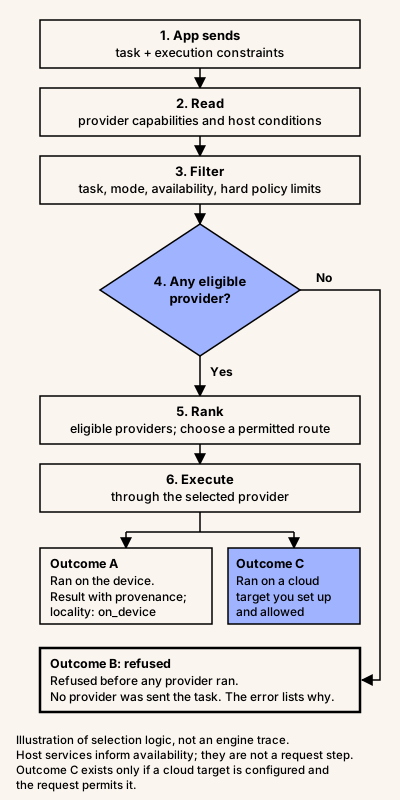
Text equivalent of the diagram:
- The app sends a task and its execution constraints.
- IndeRun reads the registered providers’ capabilities and the host conditions.
- IndeRun filters by task, interaction mode, availability and hard policy constraints.
- Decision: is any provider eligible?
- No: the request is refused with a normalized reason. Nothing runs (outcome B).
- Yes: continue.
- IndeRun ranks the eligible providers and chooses a permitted route.
- IndeRun executes through the selected provider and returns a normalized result with provenance. The outcome is either A, the task ran on the device, or C, it ran on a cloud target you configured and the request allowed.
Outcome C exists only when you registered a cloud target. Host services inform availability, but they are not a step in the request. The diagram illustrates selection logic; it is not a trace of every engine method. The implementation detail is in Placement constraints (opens in new tab).
Refusal, cloud route and fallback are different things
- Refusal. No provider survived the filter.
run()rejects with anIndeRunErrorwhoseerrorClassis"CapabilityMismatch"and whosedetails.rejectedProvidersnames each provider and its reason codes (for exampleprivacy_constraintorcapability_unavailable). Nothing executed. This is correct behaviour under your rule. See Read the outcome. - Cloud route. With
cloud_allowed, or withlocal_preferredwhen no local provider is eligible, and a configured, permitted cloud target, IndeRun may select the cloud target as its first choice. That is a route decision, not a fallback:provenance.fallbackOccurredstaysfalse. - Fallback.
provenance.fallbackOccurredistrueonly when IndeRun actually attempted more than one provider.local_requiredremoves cloud targets from the chain, so a fallback can never reach one.
provenance.locality reports "on_device", "edge", "cloud" or "unknown". It is the selected provider’s declaration, not a measurement. No edge provider ships today.
Optional: add a cloud route safely
Skip this section if on-device only is what you want. To allow a cloud route, register an OpenAI-compatible target that points at your server, not at a vendor with a key in the app. The proxy adds the API key server-side, so the app uses auth: "none". Never ship an API key in an app bundle or a request payload.
import { createIndeRunCapacitor } from "@independo/capacitor-inderun";
// Credentials stay on your server; the app calls your proxy.const ai = createIndeRunCapacitor({  openAI: {    models: ["your-model-id"],    endpointUrl: "https://api.example.com/inderun/v1", // your OpenAI-compatible proxy    auth: "none" // the proxy adds the API key server-side  }});
const result = await ai.run({  schemaVersion: "1.0",  task: { kind: "text_to_text" },  prompt: "Rewrite in plain language: Your appointment has been rescheduled.",  // Tries the device first; the configured cloud target stays eligible.  constraints: { privacy: "local_preferred" }});
console.log(result.provenance?.locality, result.provenance?.fallbackOccurred);
Google calls this pattern hybrid inference (Firebase AI Logic (opens in new tab)). With local_preferred the device is tried first and the cloud target stays eligible; with local_required it is never used. Cloud providers have their own data-processing policies, which you need to review. For a hosted gateway example, see the optional OpenRouter guide (opens in new tab).
What IndeRun does and doesn’t promise
- It applies your rule before anything runs, and reports what happened in
provenance. - It does not promise that an on-device model exists, or that your app works offline. Availability depends on the device, OS, browser and released version.
- It makes no compliance claim.
local_requiredis a routing rule, not a GDPR or other certification, and it does not control what the rest of your app sends over the network. - Telemetry is a local hook in your app. The default handler discards events, and IndeRun sends nothing to Independo.
IndeRun — open-source AI execution for cross-platform apps. Built and maintained by Independo GmbH (opens in new tab), supported by netidee (opens in new tab).
MIT-licensed SDK · No SDK usage telemetry.
© 2025–2026 Independo GmbH